
In this article
- 1 What Is n8n? (And Why It’s Worth Learning Even Though Zapier Is Easier)
- 2 How to Set Up n8n (2 Options: Cloud vs Self-Hosted)
- 3 The 7 n8n Nodes That Actually Matter (Ignore the Other 400+)
- 4 Workflow #1: Gmail to Slack Notification (The “Hello World” of n8n)
- 5 Workflow #2: Daily Twitter/X Post Automation (Schedule Trigger + AI)
- 6 Workflow #3: Webhook to Google Sheets (Capture Data from Anywhere)
- 7 What Just Broke? The n8n Debugging Guide That Actually Works
- 8 How to Learn from 1,000+ Pre-Built Workflows (Without Copy-Pasting)
- 9 Lessons From Actually Using n8n
- 10 Your Next Steps: From Beginner to Builder
- 11 You’re Not Behind - You’re Right on Time
I tried n8n a handful of times before it clicked.
Each time I quit because it felt too complex, too overwhelming, too… much. Authentication errors. Weird node configurations. Tutorials that assumed I already knew what I was doing. Everyone said n8n was “easy” and “just like Zapier but free” but I kept bouncing off it.
Then I picked one project I actually wanted to ship and committed to finishing it in n8n. The result was clunky. I built four agents where one would have done. But it worked, and that was enough for the model in my head to settle.
This is the tutorial I wish I’d had on attempt one: a setup walkthrough, three workflows you can build in a sitting, and the debugging tricks that turn “this is too hard” into “okay, I get it now.”
What Is n8n? (And Why It’s Worth Learning Even Though Zapier Is Easier)
n8n is a free, open-source automation tool that connects apps and services together. Think Zapier or Make.com, but you own it.
Here’s the rough shape (always check current pricing - SaaS plans move):
| Feature | n8n | Zapier | Make |
|---|---|---|---|
| Cost | Free self-hosted or paid cloud | Tiered, per-task | Tiered, per-operation |
| Workflows | Unlimited | Limited by plan | Limited by plan |
| Learning curve | Steeper | Easiest | Medium |
| Customization | Full code access | Limited | Medium |
| Execution limits | None (self-hosted) | Plan-based | Plan-based |
Why people choose n8n:
- No per-execution fees (huge if you run workflows at scale)
- Self-hosting means you control everything
- Code nodes let you customize anything
- Open-source community constantly adds integrations
Why it’s harder: Zapier holds your hand. n8n expects you to figure some things out. Authentication setup is more manual. Error messages are less friendly. The first hour is rougher.
But here’s the thing: once you get past the setup friction, n8n becomes your most powerful tool. You’re not locked into pricing tiers. You’re not limited by “tasks per month.” You build what you need, exactly how you need it.
Worth it? For me, absolutely.
One important update: if you’re using AI coding agents now, n8n is not the whole stack. It is the automation layer. I broke down the split in Claude Code vs n8n and the lean stack in AI stack for solo founders.
Related Reading:
How to Set Up n8n (2 Options: Cloud vs Self-Hosted)
You have two paths. Pick based on your comfort level and budget.
Option 1: n8n Cloud (Fastest)
If you just want to start building:
- Go to n8n.io
- Click “Start for free”
- Sign up with email
- You’re in. Start building immediately.
Pros: Zero setup. Free trial. Good for testing.
Cons: Recurring fee. You’re on their infrastructure.
Option 2: Self-Hosted on a small VPS (What I Use)
This is what I run. One-time setup, then you own the box.
What you’ll need:
- A VPS like Hostinger (their entry-level plan is fine)
- Basic command line comfort (I’ll walk you through)
Steps:
- Spin up a small VPS
- SSH into your server
- Install Docker:
curl -fsSL https://get.docker.com -o get-docker.sh && sh get-docker.sh - Run n8n container:
docker run -it --rm --name n8n -p 5678:5678 -v ~/.n8n:/home/node/.n8n n8nio/n8n - Access at
http://your-server-ip:5678
Some hosts now have one-click n8n installers, which makes this even faster. The manual Docker route is still short.
Why self-hosted: Unlimited workflows, no per-execution fees, full control. The trade-off is you own the maintenance.
First Login: What You’ll See
You’ll land in a blank canvas with a ”+” button. This is your workflow editor. Don’t panic - it’s simpler than it looks.
Click the ”+” and you’ll see the node library. Over 400 integrations. Ignore most of them for now.
The 7 n8n Nodes That Actually Matter (Ignore the Other 400+)
n8n has 400+ nodes. I use the same 7 for 90% of my workflows.
Here’s what I learned: You don’t need to learn all the nodes. You need to master the ones you’ll actually use.
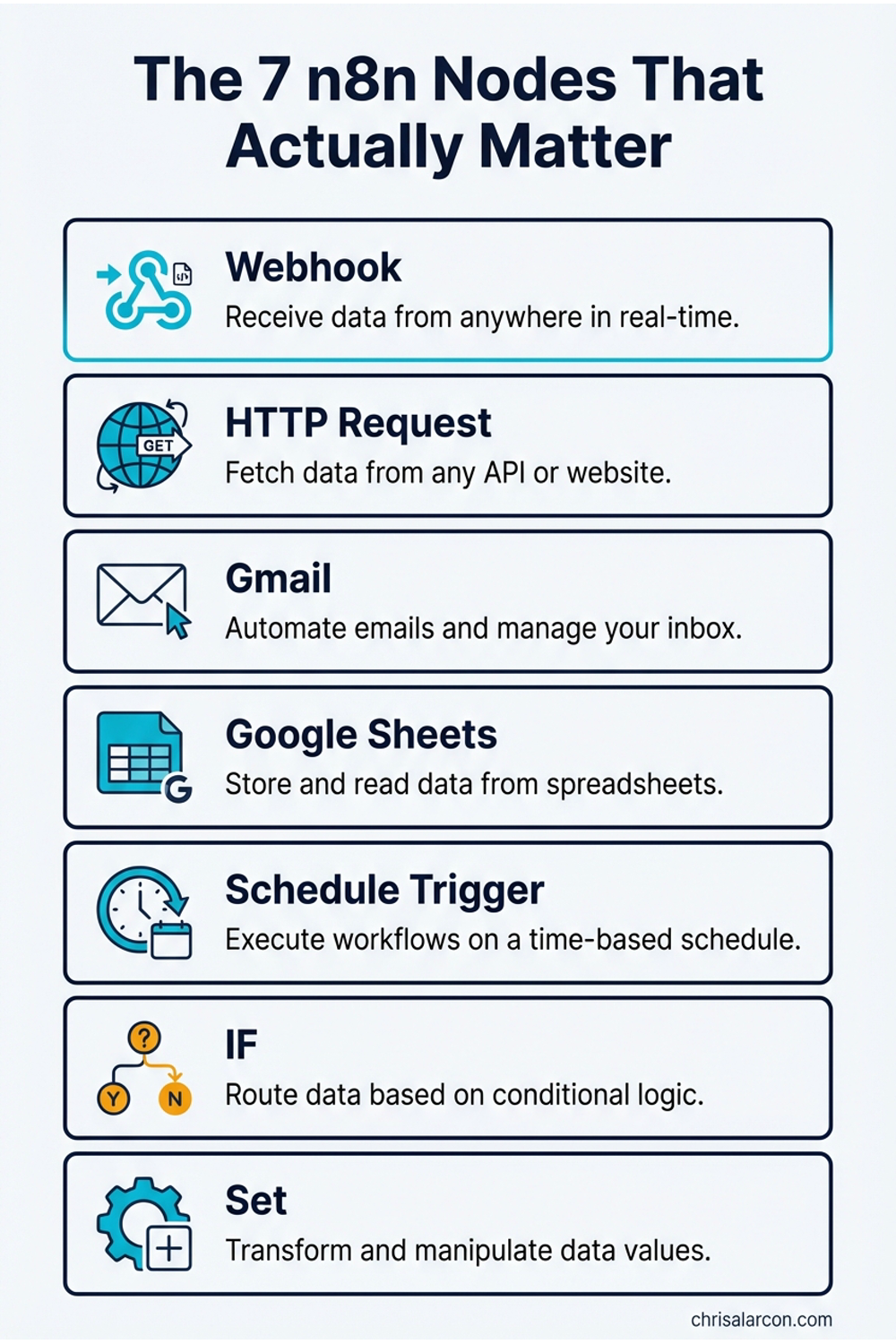
1. Schedule Trigger Runs workflows on a schedule (daily at 9am, every Monday, etc.). Perfect for recurring automations.
2. Webhook Trigger Lets external services trigger your workflow via URL. Foundation for Zapier-style integrations.
3. Code Node Write custom JavaScript. This is where n8n becomes infinitely flexible. I use this constantly.
4. Switch Node Routes data based on conditions (if status = “paid”, do X; if status = “pending”, do Y). Essential for complex logic.
5. IF Node Simple true/false logic. Cleaner than Switch when you only need 2 paths.
6. Set Node Formats data. Renames fields, extracts values, cleans up messy API responses.
7. Wait Node Pauses workflow execution (wait 5 minutes, wait until specific date). Critical for timing-sensitive automations.
Bonus: AI Agent Node Connects Claude, ChatGPT, and other LLMs directly into workflows. This is where workflows stop being “if-this-then-that” and start handling judgment calls. If you want to build agentic workflows that make decisions and use tools, check out my guide to building agentic n8n workflows with the AI Agent node.
Start with these. Once you’re comfortable, explore the other 393 nodes. But you can build 90% of useful automations with just this core set.
Workflow #1: Gmail to Slack Notification (The “Hello World” of n8n)
Let’s build your first workflow. Simple, practical, teaches the fundamentals.
What it does: When you get an important email, it sends a Slack notification instantly.
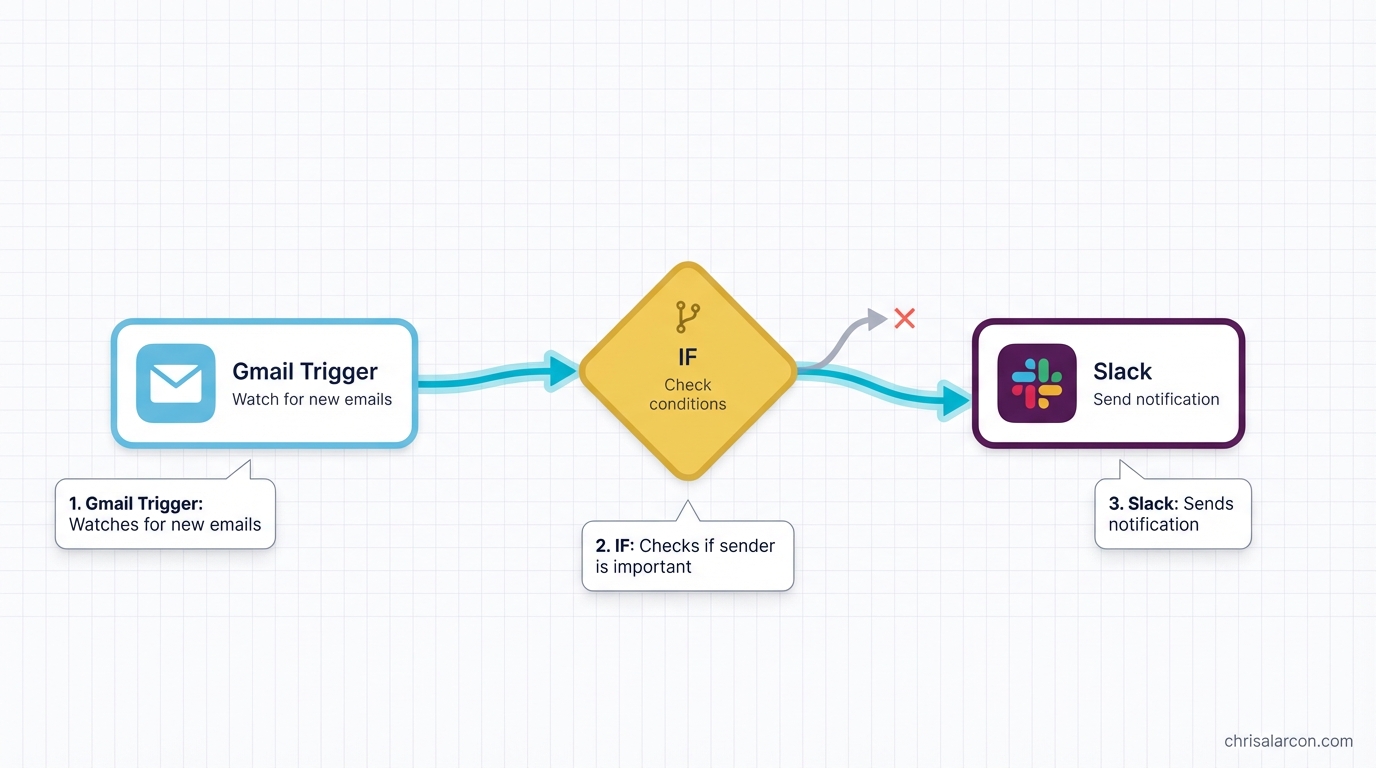
Step-by-step:
-
Add Gmail Trigger
- Click ”+” → Search “Gmail Trigger”
- Select “On Message Received”
- Click “Connect my account”
- Authorize Google (this is the authentication step everyone struggles with - just follow the OAuth flow)
-
Add IF Node
- Click ”+” → Search “IF”
- Set condition:
{{ $json["subject"] }}contains “urgent” - This filters only urgent emails
-
Add Slack Node
- Click ”+” → Search “Slack”
- Connect your Slack workspace
- Choose channel (e.g., #alerts)
- Message:
New urgent email from {{ $json["from"]["name"] }}: {{ $json["subject"] }}
-
Test It
- Click “Execute Workflow”
- Send yourself a test email with “urgent” in subject
- Check Slack
What you just learned:
- Authentication (connecting Gmail + Slack)
- Triggers (Gmail watching for new emails)
- Data mapping (those
{{ $json["field"] }}expressions) - Testing workflows before activating them
Common error: “Authentication failed” → Go back to the node, click “Reconnect”, re-authorize. n8n’s OAuth sometimes needs a second try.
Workflow #2: Daily Twitter/X Post Automation (Schedule Trigger + AI)
Now let’s build something that runs on autopilot.
What it does: Every day at 9am, Claude generates an automation tip and posts it to Twitter/X.
Step-by-step:
-
Add Schedule Trigger
- Click ”+” → “Schedule Trigger”
- Set to “Every Day” at 9:00am
-
Add AI Agent Node
- Click ”+” → Search “AI Agent”
- Connect Claude API (you’ll need an Anthropic API key)
- Prompt:
Write a 1-sentence automation tip for solo builders running lean AI businesses. Make it actionable and specific. No hashtags.
-
Add Twitter Node
- Click ”+” → Search “Twitter”
- Connect your Twitter account
- Tweet text:
{{ $json["output"] }}
-
Activate It
- Click the toggle in top-right: “Inactive” → “Active”
- Your workflow is now live. It’ll run every morning at 9am automatically.
Key difference from Workflow #1: This one RUNS without you. Once activated, n8n executes it on schedule. You’re not clicking “Execute” - it just happens.
What you just learned:
- Schedule triggers (time-based automation)
- AI integration (Claude generating content)
- Activating vs testing (live workflows vs manual execution)
This is where automation starts to feel worth it. You build it once, then it runs unattended (until something upstream changes - which it will).
Workflow #3: Webhook to Google Sheets (Capture Data from Anywhere)
Final workflow: the foundation for advanced automation.
What it does: Create a custom webhook URL that receives data and saves it to Google Sheets. Use this for form submissions, Zapier alternatives, custom integrations - anything.
Step-by-step:
-
Add Webhook Trigger
- Click ”+” → “Webhook”
- Method: POST
- Copy the webhook URL (looks like
https://your-n8n.com/webhook/abc123)
-
Add Set Node (optional but recommended)
- Formats incoming data
- Map fields:
name = {{ $json["body"]["name"] }},email = {{ $json["body"]["email"] }}
-
Add Google Sheets Node
- Click ”+” → “Google Sheets”
- Connect your Google account
- Choose spreadsheet and sheet
- Map columns to data fields
-
Test It
- Use Postman or curl to send test POST request:
curl -X POST https://your-n8n.com/webhook/abc123 \ -H "Content-Type: application/json" \ -d '{"name":"Chris","email":"test@example.com"}'- Check Google Sheets - data should appear
What you just learned:
- Webhooks (HTTP endpoints you control)
- Data transformation (Set node cleaning up messy inputs)
- Google Sheets integration (foundational for so many workflows)
This pattern matters. Most SaaS tools, form builders, and APIs can send webhook data. Once you understand this one workflow, the connectable surface area gets a lot bigger.
Want more n8n workflows?
I send practical automation systems from the Ship Lean build - real workflows I’m testing, not recycled theory. No spam, unsubscribe anytime.
What Just Broke? The n8n Debugging Guide That Actually Works
You’ll hit errors. Everyone does. Here’s how to fix the most common ones.
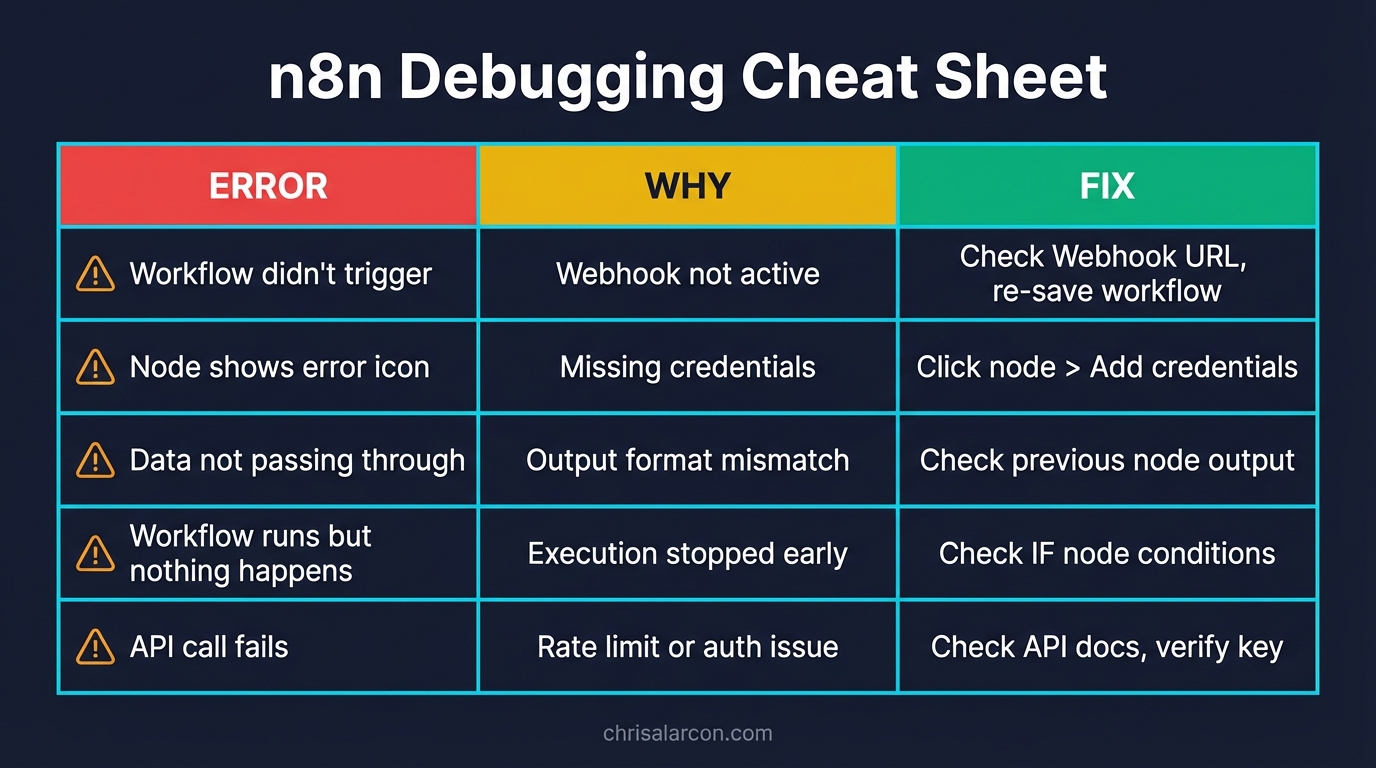
Error #1: “Authentication Failed”
What it means: The app connection dropped or expired.
Fix:
- Click on the node with the error
- Click “Reconnect” or “Select Credential”
- Re-authorize the app (OAuth flow)
- Test again
Error #2: “Cannot Read Property of Undefined”
What it means: You’re trying to access data that doesn’t exist.
Fix:
- Click the node BEFORE the error
- Look at the output data (bottom panel)
- Check your expression:
{{ $json["field"] }}must match actual field names - Use the “Expression Editor” (click the
=icon) to see available fields
Error #3: “Expression Could Not Be Resolved”
What it means: Syntax error in your data mapping.
Fix:
- Common mistakes:
- Missing brackets:
{{ $json["name"] }}not{{ $json[name] }} - Wrong node reference:
{{ $node["Node Name"].json["field"] }} - Typo in field name
- Missing brackets:
- Use the Expression Editor to validate syntax
My 5-Step Debug Process:
- Execute one node at a time - Click “Execute Node” instead of “Execute Workflow”
- Check the output panel - Bottom of screen shows exactly what data the node produced
- Use the Code node to log data - Add
console.log(items)to see what’s actually there - Test with static data first - Use “Set” node with hardcoded values to isolate issues
- Check the n8n community forum - Someone’s hit your exact error before
Turns out: Debugging is half the skill. Get good at reading error messages and checking data output, and you’ll fix issues in 2 minutes instead of 2 hours.
How to Learn from 1,000+ Pre-Built Workflows (Without Copy-Pasting)
You don’t have to build everything from scratch.
Where to find templates: n8n.io/workflows - 1,000+ pre-built workflows
How to use them:
- Browse templates (filter by category: Marketing, Sales, Productivity, etc.)
- Click “Use Workflow”
- It opens in your n8n editor
- Reconnect credentials (templates don’t include your API keys)
- Modify to fit your use case
Best templates for beginners:
- “Send Slack notification for new Gmail” - Teaches triggers + messaging
- “Save form submissions to Google Sheets” - Teaches webhooks + data storage
- “Daily weather report to email” - Teaches schedule triggers + external APIs
- “Summarize web articles with AI” - Teaches AI integration + HTTP requests
Here’s what I learned: Don’t just copy-paste. Study how they built it. See how they structured nodes. Then adapt the pattern to your own workflows.
The template library is a masterclass in workflow design. Use it.
Lessons From Actually Using n8n
Here’s what I wish I’d known on day one:
1. Plan First, Build Second
I used to jump straight into n8n. Bad move. Now I sketch workflows in Excalidraw first. 10 minutes of planning saves hours of rebuilding.
2. Only a Few Nodes Matter
You don’t need to learn 400 nodes. Master the core 7-10. I still barely touch 90% of the library.
3. Find the Nodes You Enjoy
Some people love the Code node. Others prefer visual logic (IF, Switch). Figure out which style fits your brain and lean into it.
4. Give Yourself Permission to Fail
Not every workflow needs to be perfect. Some are stepping stones. My first automation (that faceless YouTube workflow) was clunky - 4 agents when it should’ve been 1 - but it taught me how the tool actually behaves.
5. Start with Templates, Then Customize
Templates teach you patterns. Once you understand the pattern, you can apply it anywhere.
6. Debugging Is Part of the Process
I used to think errors meant I was doing it wrong. Now I know: errors are just feedback. Read them, fix them, move on.
7. Self-Hosting Earns Its Keep Quickly
If you’re going to run more than a couple of workflows, self-hosting n8n on a small VPS like Hostinger usually wins on cost vs per-task SaaS pricing. Unlimited workflows, no execution limits, full control. The trade-off is you own the box.
Callback: My first n8n project was a mess. But it worked, and that was enough to keep going. Ship something clunky. Refine later.
Your Next Steps: From Beginner to Builder
You’ve built 3 workflows. You know the core nodes. You can debug basic errors. Now what?
Immediate (Next 24 Hours):
- Build one of the 3 workflows above (pick the one you’d actually use)
- Test it until it works
- Activate it and let it run
This Week:
- Explore the template library - find 3 workflows you’d use
- Customize one template to fit your exact use case
- Break something, then fix it (seriously, debugging practice is how you learn)
This Month:
- Build one automation that removes a recurring chore from your week
- Examples:
- Daily digest of top Hacker News posts → email
- New blog post → drafted social posts, queued for review
- Form submissions → auto-add to CRM + send confirmation email
Once that’s boring:
- Self-host n8n on your own server
- Build multi-step workflows with more logic (Switch, Loop, Merge nodes)
- Add an LLM step where judgment matters (see the n8n AI Agent tutorial)
- Connect n8n to the rest of your stack
Related Reading:
You’re Not Behind - You’re Right on Time
I tried n8n a handful of times before it worked. You might need two tries. You might get it on the first one. Doesn’t really matter.
What matters: you now know how to set up n8n, build three working workflows, and debug the most common errors. That puts you ahead of most people who hear “n8n” and think “too complicated.”
You have the tutorial. You have the workflows. You have the debugging checklist.
The only thing left is to actually build something. Pick one workflow from this guide. Build it. Break it. Fix it. Then build another.
Before you go full speed, read how to save time with automation without building systems you never use. It’ll help you pick the right workflows first - the ones that actually pay off instead of sitting there untouched. And if you’re not sure which repetitive tasks to tackle, here’s my process for mapping your workflows and automating what matters.
If you’d rather skip the building and have a content workflow set up around your videos, Content Flywheel DFY is the done-for-you version.
Otherwise, start here and I’ll send you the free prompt pack plus the next useful system I package.

Written by
Chris AlarconChris Alarcon builds Ship Lean: practical AI systems for solo builders who need their product work to turn into distribution and revenue. He shares the exact Claude Code, n8n, content, and workflow systems he uses in public.
Work With Me
Turn proof into distribution
If the article exposed a bottleneck, I can help map the system, build the assets, and route it into tools, workflows, AEO content, newsletters, and short-form distribution.
See the offer →Want more workflows like this?
Every Saturday I send one automation workflow you can steal. Real systems, not theory. Join builders turning product work into distribution.
Get Saturday's Workflow →